MARK UP
Make every zone
tell the story.
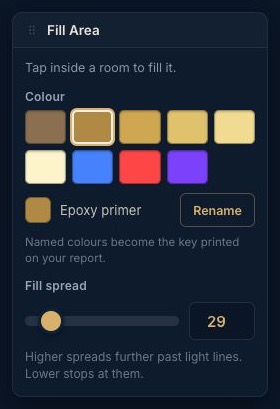
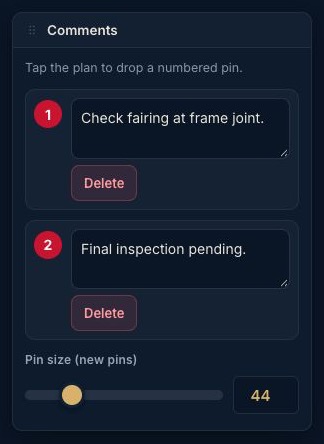
Paint rooms, draw precise areas and put findings where they happened. Your colours turn a working drawing into a clear view of progress.
Paint & fill · Polygons · Notes & findings
 YachtTracer™
YACHT GA MARKUP & REFIT REPORTING
Mark up yacht plans, track work zone by zone and share clear PDF reports. One simple workspace for the work in front of you.
A CLEARER WAY TO WORK.
Familiar tools, a clear drawing and a report ready to share. Keep the detail where it belongs, right on your General Arrangement.
Try it on your own drawingMARK UP
Paint rooms, draw precise areas and put findings where they happened. Your colours turn a working drawing into a clear view of progress.
REPORT
Bring the marked-up drawing, named colour key and numbered findings into a clean PDF. A report the next person can understand.
Your marked-up GA.
Your colour key.
Your findings, in context.
Set one known distance. Measure the rest of your plan with a clear reference.
Browser autosave keeps your work on this device, ready for your next session.
Save an editable .yachttracer file to keep a copy or move between devices.
SIMPLE FROM THE FIRST MARK.
Drop in a PNG, JPEG or WebP, or reopen a saved YachtTracer project.
Fill zones, add notes, measure distances and colour-code progress your way.
Export a clean PDF and send it to the people who need to see it.
SAME WORKSPACE. YOUR WAY OF WORKING.
FROM FAIRING TO FINAL COAT
Keep coating stages visible on the GA. Give each stage a colour, mark the areas completed and send a clear progress report to the yard or owner's representative.
No. YachtTracer uses familiar paint, fill, polygon and annotation tools. Open a drawing and work directly on it.
Projects and autosaves are stored locally in your browser on this device. Save a portable .yachttracer project file to keep a separate copy or move your work between devices.
Yes. Try the demo with your own drawing, without an account. Saving and PDF export require a plan.
Open PNG, JPEG and WebP drawings, or reopen an editable .yachttracer project.
YOUR NEXT REPORT STARTS HERE.
Bring your GA. See what a little clarity can do.